


Its quite possible to outfit your computer with all quality freeware applications. Here a good list of some of the best:
Object Dock
Personally I like to have no icons at all on my desktop. Object dock is handy to put all your frequently accessed programs and folders Into.
Sumatra PDF Viewer
Sick of Adobe Acrobat? Most people are and this is a great, free and lightweight alternative.
Format Factory
FormatFactory is a multifunctional media converter.
Provides functions below:
All to MP4/3GP/MPG/AVI/WMV/FLV/SWF.
All to MP3//WMA/MMF/AMR/OGG/M4A/WAV.
All to JPG/BMP/PNG/TIF/ICO/....
Rip DVD to video file.
MP4 files support iPod/iPhone/PSP/BlackBerry format.
Source files support RMVB.
Simply Zip
Great lightweight and powerful archiving/unzipping tool.
CCCleaner
CCleaner is a freeware system optimization, privacy and cleaning tool. It removes unused files from your system - allowing Windows to run faster and freeing up valuable hard disk space. It also cleans traces of your online activities such as your Internet history. Additionally it contains a fully featured registry cleaner.
Spybot
Spy and adware cleaner
Ad Aware Free
Its always good to have two spyware cleaners in case one misses something. This is anoter good one.
VLC player
The best media player around. A must have if you watch any video.
UTorrent
Best torrent client around.
Feed Reader 3
Rss Reader
Open Office
Just like Microsoft Office except Free!
The Gimp
Just like Photoshop but Free!
Foobar 2000
Lightweight, easy to use audio player. Last.fm supported
Firefox
The only browser to use.
Totally free burner
Lightweight and powerful CD Burner
Mozbackup
A simple utility for creating backups of Firefox.
Text Edit
TextEdit is the simple and easy to use powerful text editor for Windows that allows you view and edit HTML, CSS, JavaScript, PHP, PERL, SQL, Delphi, C, C++, and other languages source code. It is a advanced tool supporting the features you've always dreamt about, such as tabbed document view, syntax highlighting, bookmarks, unlimited text size, line numbers, powerful find and replace, find in files, multiple undo/redo, drag and drop files.
Peer Guardian
PeerGuardian 2 is Phoenix Labs’ premier IP blocker for Windows. PeerGuardian 2 integrates support for multiple lists, list editing, automatic updates, and blocking all of IPv4 (TCP, UDP, ICMP, etc), making it the safest and easiest way to protect your privacy on P2P.
AVG Free
Virus protection
Thunderbird
Microsoft Outlook Replacement
Sygate Personal Firewall
Sygate Personal Firewall is much more than an user-friendly and advanced personal firewall, it is a bi-directional intrusion defense system.
Chase HQ2 Evo 3d
Racing game
Dragonball vs streetfighter
Fighting game
Cottage of doom
zombie survival game
Dogfight: Battle in the Skies
Pilot game
Frets on Fire
Guitar Hero Alternative
Super Mario: Blue Twilight DX
Super Mario
Showing posts with label Tutorials. Show all posts
Showing posts with label Tutorials. Show all posts
Friday, September 12, 2008

Friday, September 5, 2008
You Suck at Photoshop
Hilarious tutorial series. watch them all.
http://www.mydamnchannel.com/Big_Fat_Brain/You_Suck_At_Photoshop__Season_2/YouSuckAtPhotoshop16DefineBrushPreset_899.aspx
Saturday, August 30, 2008
Easy party/magic tricks video tutorials
Its good to know a good party/magic trick or two so here is some good ones to amaze your friends.
1. Disappearing cigarette
2. Card change
3.Quick as a wink
4.Card change 2
5. Rip up a coin
1. Disappearing cigarette
2. Card change
3.Quick as a wink
4.Card change 2
5. Rip up a coin
Saturday, August 16, 2008
An intro to RSS feeds for dummies
RSS stands for Rich Site Summary or Really Simple Syndication. Basically it's a way to check regularly updated sites without having to actually go to the site. It's useful for a number of applications, like blogs and torrent sites. If your a compulsive website checker, RSS is a good way to put most of your sites into one central place that will automatically update in tandem with the websites that you check. All you really need is a RSS reader and the RSS links to the sites you check frequently. So first lets go ahead and get an RSS Reader. I currently use Feedreader. It's a good and free RSS reader. You can get it here http://www.feedreader.com/
Now lets setup Feedreader, then find and add so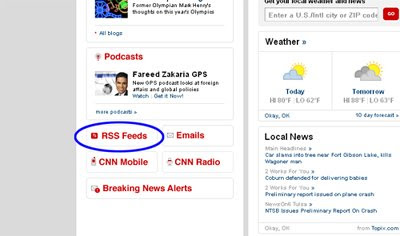 me RSS feeds.
Once you have Feedreader installed, open up your web browser and head over to www.cnn.com. If you look at the screenshot, near the end of the page there is a rss button link. Click that and it will give you a list of all their rss feeds. So I'm going to pick their technology feed, so just copy the link, then pull up feedreader and go to File>New> Feed, then just paste the RSS link and hit ok. That's really all there is to adding feeds to feedreader. You'll probably want to organize your feeds into folders like news, blogs etc. If you download torr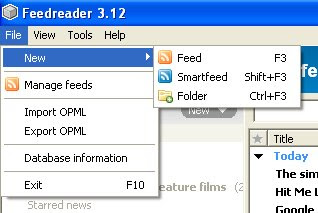 ents alot, most all torrent sites have rss feeds of all their categorys and it will save you alot of time waiting.If you use utorrent 1.8 for your torrent download needs, it actually has a rss feed reader built right in so check that out.
DIGG this!
If anyone wants to suggest an article, or be a guest writer on this blog leave me a comment with your email address.
Now lets setup Feedreader, then find and add so
 me RSS feeds.
Once you have Feedreader installed, open up your web browser and head over to www.cnn.com. If you look at the screenshot, near the end of the page there is a rss button link. Click that and it will give you a list of all their rss feeds. So I'm going to pick their technology feed, so just copy the link, then pull up feedreader and go to File>New> Feed, then just paste the RSS link and hit ok. That's really all there is to adding feeds to feedreader. You'll probably want to organize your feeds into folders like news, blogs etc. If you download torr
 ents alot, most all torrent sites have rss feeds of all their categorys and it will save you alot of time waiting.If you use utorrent 1.8 for your torrent download needs, it actually has a rss feed reader built right in so check that out.
DIGG this!
If anyone wants to suggest an article, or be a guest writer on this blog leave me a comment with your email address.
Saturday, May 10, 2008
Torrent guide: Info Tips and Tricks
This article will give you the information you need to be safe while downloading torrents, and how to avoid downloading viruses/trashed files. This will be geared toward newbies, but some intermediate users my find some good and useful tips.
1. Basic Info
First lets start off with a brief and simplified explanation of what a torrent is. A torrent file is a small file that you download and then open in a torrent client. Once you open a torrent file in a client it will connect to other users downloading or seeding the particular file and download the file in pieces to your computer. The more people seeding or downloading a file, the faster it will download. Seeding means that a user is uploading the file to you.
Its important to keep up to date with the torrent community and not just download every file you see. Or else you could download viruses, get a trashed file or get in trouble with your isp or other groups. So its important to protect yourself and use a set of rules while downloading.
If you would like to understand the torrent protocol in more detail here is some further reading links:
Bittorrent Wiki
Bittorrent on HowStuffWorks
2. Programs and Sites
Now that you understand what a torrent is and why you need to protect yourself here is the tools and sites i recommend:
Programs:
Utorrent
Best torrent client out.
Peerguardian
Peer guardian will block ip addresses from ill meaning computers, it won't protect you 100% but it is a must have and make sure to keep the lists updated.
AVG Free
You should have a anti virus prog if your on the internet at all, and more so if you download torrents. Keep it up to date
Gspot
If you download a video and have trouble playing it, this program will tell you which codec you need to play it and if you have it installed.
Nimo Codec Pack
Used for playing many different video formats.
Websites:
Mininova
Massive torrent archive
isohunt
If you can't find it on mininova go here.
Seedpeer
This site has verified torrents
EzTV
Excellent site for tv torrents
torrentfreak
Keep up to date on torrent news
3.Searching and Downloading
So after you have downloaded all the programs and bookmarked all the sites
and are ready to download a torrent, follow these steps:
Make sure Anti-virus and Peer Guardian are running and on.
Search for the torrent, start with Mininova, if you cant find what you are looking for there, move on to the other sites.
Iff you get alot of search results for what you are looking for, investigate the torrent with the most seeds and downloaders. Ex.1
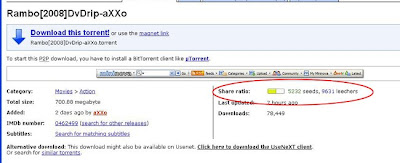
Next, read the comments. if others are saying its got a virus or it is passworded or nuked, move on to another torrent.
Next look at the file size. It's easiest to tell on videos if it's a good file. 30 min tv eps in standard quality are around 175 mb. One hour 350mb. Standard quality 1 1/2 hour movie is 700 mb. If a file is a strange or low file size I would stay away.
As a rule I would stay away from any torrent file that is Just one single archived file (.rar or .zip) these are usually either fake or passworded. Although some release groups split files into a bunch of .rar files these are an exception.
Now look at the way the file name is tagged. Lets take a look at a example:
the.office.412.hdtv-lol
It has the name of the show, (the office), the season(4), the episode number(12), quality/source (hdtv) and who released it (lol)
Get familiar with the groups who release the files its another good way to get good quality virus free files. here are some good release groups to look for:
LOL
AXXO
Klaxxon
Also you could do a search for just the release group on mininova or any other site to get a list of thier files, but always make sure to look at who uploaded the file, it's easy just to slap a release groups name on a file.
It seems like alot just to download a file but it will become second nature if you download alot.
4. Going further
Using these methods will eventually allow you to find pretty much anything, and keep you from getting viruses and trashed files.
If you use torrents a lot it can get overwhelming checking each site for every release. You can set up RSS feeds for your sites and releases in firefox or a news reader which can save you time.
It's also faster and slightly safer if you use member only torrent sites. Keep checking these sites for open sign up dates.
5. Final Information
Remember that in most countries it is illegal to download copyright infringing material without paying for it. Always try to find what you are looking for in a legal way. If your into Tv shows most all the network streams alot of their episodes online for free. There is also other websites that offer free streaming movies. check out my earlier post on this info. HERE
ver 1.0
1. Basic Info
First lets start off with a brief and simplified explanation of what a torrent is. A torrent file is a small file that you download and then open in a torrent client. Once you open a torrent file in a client it will connect to other users downloading or seeding the particular file and download the file in pieces to your computer. The more people seeding or downloading a file, the faster it will download. Seeding means that a user is uploading the file to you.
Its important to keep up to date with the torrent community and not just download every file you see. Or else you could download viruses, get a trashed file or get in trouble with your isp or other groups. So its important to protect yourself and use a set of rules while downloading.
If you would like to understand the torrent protocol in more detail here is some further reading links:
Bittorrent Wiki
Bittorrent on HowStuffWorks
2. Programs and Sites
Now that you understand what a torrent is and why you need to protect yourself here is the tools and sites i recommend:
Programs:
Utorrent
Best torrent client out.
Peerguardian
Peer guardian will block ip addresses from ill meaning computers, it won't protect you 100% but it is a must have and make sure to keep the lists updated.
AVG Free
You should have a anti virus prog if your on the internet at all, and more so if you download torrents. Keep it up to date
Gspot
If you download a video and have trouble playing it, this program will tell you which codec you need to play it and if you have it installed.
Nimo Codec Pack
Used for playing many different video formats.
Websites:
Mininova
Massive torrent archive
isohunt
If you can't find it on mininova go here.
Seedpeer
This site has verified torrents
EzTV
Excellent site for tv torrents
torrentfreak
Keep up to date on torrent news
3.Searching and Downloading
So after you have downloaded all the programs and bookmarked all the sites
and are ready to download a torrent, follow these steps:
Make sure Anti-virus and Peer Guardian are running and on.
Search for the torrent, start with Mininova, if you cant find what you are looking for there, move on to the other sites.
Iff you get alot of search results for what you are looking for, investigate the torrent with the most seeds and downloaders. Ex.1

Next, read the comments. if others are saying its got a virus or it is passworded or nuked, move on to another torrent.
Next look at the file size. It's easiest to tell on videos if it's a good file. 30 min tv eps in standard quality are around 175 mb. One hour 350mb. Standard quality 1 1/2 hour movie is 700 mb. If a file is a strange or low file size I would stay away.
As a rule I would stay away from any torrent file that is Just one single archived file (.rar or .zip) these are usually either fake or passworded. Although some release groups split files into a bunch of .rar files these are an exception.
Now look at the way the file name is tagged. Lets take a look at a example:
the.office.412.hdtv-lol
It has the name of the show, (the office), the season(4), the episode number(12), quality/source (hdtv) and who released it (lol)
Get familiar with the groups who release the files its another good way to get good quality virus free files. here are some good release groups to look for:
LOL
AXXO
Klaxxon
Also you could do a search for just the release group on mininova or any other site to get a list of thier files, but always make sure to look at who uploaded the file, it's easy just to slap a release groups name on a file.
It seems like alot just to download a file but it will become second nature if you download alot.
4. Going further
Using these methods will eventually allow you to find pretty much anything, and keep you from getting viruses and trashed files.
If you use torrents a lot it can get overwhelming checking each site for every release. You can set up RSS feeds for your sites and releases in firefox or a news reader which can save you time.
It's also faster and slightly safer if you use member only torrent sites. Keep checking these sites for open sign up dates.
5. Final Information
Remember that in most countries it is illegal to download copyright infringing material without paying for it. Always try to find what you are looking for in a legal way. If your into Tv shows most all the network streams alot of their episodes online for free. There is also other websites that offer free streaming movies. check out my earlier post on this info. HERE
ver 1.0
Subscribe to:
Comments (Atom)