


Learning
Motley Fool investing article
Howstuffworks - online trading
Investopedia - Building blocks
Investing online article
Zion's Bank - Zion University
All penny stocks - Beginners corner
Quotes, recommendations and news
The Street
Google Finance
Stock Charts
Penny stock finder
Financial market news
WikiInvest
Online Brokerages
Sharebuilder
Etrade
Scottrade
Wednesday, June 25, 2008

Tuesday, June 10, 2008
Legitimate sites where you can earn money and prizes
There are hundreds of sites out there that tell you that you can make money by filling this or that survey out. Most of these are scams, but there are a handful that actually pay out. There are also two really good sites where you just play games on the site and can earn money and prizes. Sign up for these and try them out. If you try to find other sites on your own, be smart about it and if asked to enter any financial information, never, ever do that! Lets take a look at the top 5 sites:
Moola
This site will give you one penny, then you can play games to keep doubling that penny. Very interesting idea, it can be frustrating sometimes but its worth it.
Gamevance
This is a pretty good site, it offers six different games per day and the highest score for each game wins a prize. Currently some of the prizes to choose from are an Ipod touch, $200 Visa gift card, Sony Cybershot and Sony Psp. Not bad...
Treasure Trooper
Fill out surveys and complete offers to gain money in your account. There is an option to be paid by Paypal. Nifty.
Globaltestmarket
Fill out surveys and gain market points, once you have enough market points they will cut you a check.
Inboxdollars
This site will send you emails and you just click on a link and it will place a few cent in your account, there is also paid surveys and offers.
Moola
This site will give you one penny, then you can play games to keep doubling that penny. Very interesting idea, it can be frustrating sometimes but its worth it.
Gamevance
This is a pretty good site, it offers six different games per day and the highest score for each game wins a prize. Currently some of the prizes to choose from are an Ipod touch, $200 Visa gift card, Sony Cybershot and Sony Psp. Not bad...
Treasure Trooper
Fill out surveys and complete offers to gain money in your account. There is an option to be paid by Paypal. Nifty.
Globaltestmarket
Fill out surveys and gain market points, once you have enough market points they will cut you a check.
Inboxdollars
This site will send you emails and you just click on a link and it will place a few cent in your account, there is also paid surveys and offers.
Tuesday, June 3, 2008
Top 5 Addicting Flash games
1. Toon Crisis
Shoot lightning from your fingertips at little evil cartoon characters, great graphics and gameplay.
2. Bloons
Help a little monkey shoot balloons. very addictive.
3. Jewel Quest
Great Puzzle/Matching game
4.Camperstrike
Good Target shooting game.
5. Last Stand
Zombie shoot 'em up game. Good graphics.
src="http://pagead2.googlesyndication.com/pagead/show_ads.js">
Shoot lightning from your fingertips at little evil cartoon characters, great graphics and gameplay.
2. Bloons
Help a little monkey shoot balloons. very addictive.
3. Jewel Quest
Great Puzzle/Matching game
4.Camperstrike
Good Target shooting game.
5. Last Stand
Zombie shoot 'em up game. Good graphics.
src="http://pagead2.googlesyndication.com/pagead/show_ads.js">
Wednesday, May 21, 2008
Firefox - Organize and surf smarter
If your like me you probably have a lot of websites you check everyday. It used to drive me crazy trying to find each one scattered throughout my bookmarks. These tips may seem simple, but its amazing how streamlined you can be once you are organized. I am focusing on Firefox, but if you use a different browser I'm sure a lot of the tips can be used in whatever browser you use.
1. Organizing
I would first organized your bookmarks. Focus on the sites that you use everyday, organize them into folders using Firefox's bookmark manager. (Bookmarks>Organize Bookmarks). The sites you use most, i would place in the bookmark tool bar folder. This is how mine is set up to give you an idea:
Web Accounts> (Sub folders: Online Storage, Banking Accounts, Social, Email Accounts)
Tools: Imdb, Mapquest, yellowpages.com, Proxy, Online Photo Editor, Etc
Blogs> Have RSS feeds to all the blogs i read here.
I would also have a folder called "sort" or something like that for any new finds you want to check out later so your bookmarks doesn't get so disorganized quickly.
2. Start Pages
One cool feature about Firefox is that you can have multiple tabbed start pages when you open Firefox. The way you do this is open up all the websites you want to start up, have them tabbed the way you want them, then go to tools>options, then under startup click "use current pages" button.The next time you start Firefox, those pages will load up.
On the subject of start pages, a good start page is Netvibes, get a free account and you can add all your rss feeds, email accounts and other stuff.It's very useful, check it out.
3. Hot keys and other stuff
Essential Hot keys:
Ctrl + T - Open new tab
Ctrl + page down - Tab through open tabs
Ctrl + n - New Window
Ctrl + D - Bookmark
Ctrl + Shift + R - Reload and overide cache
Other Tips:
To maximize your Firefox viewing space use small icons, go to view>toolbars>customize, then check use small icons.
Check out the Greasemonkey Firefox add-on to add functions to popular websites.
https://addons.mozilla.org/en-US/firefox/addon/748
Maybe more on that later
Ver 1.0
1. Organizing
I would first organized your bookmarks. Focus on the sites that you use everyday, organize them into folders using Firefox's bookmark manager. (Bookmarks>Organize Bookmarks). The sites you use most, i would place in the bookmark tool bar folder. This is how mine is set up to give you an idea:
Web Accounts> (Sub folders: Online Storage, Banking Accounts, Social, Email Accounts)
Tools: Imdb, Mapquest, yellowpages.com, Proxy, Online Photo Editor, Etc
Blogs> Have RSS feeds to all the blogs i read here.
I would also have a folder called "sort" or something like that for any new finds you want to check out later so your bookmarks doesn't get so disorganized quickly.
2. Start Pages
One cool feature about Firefox is that you can have multiple tabbed start pages when you open Firefox. The way you do this is open up all the websites you want to start up, have them tabbed the way you want them, then go to tools>options, then under startup click "use current pages" button.The next time you start Firefox, those pages will load up.
On the subject of start pages, a good start page is Netvibes, get a free account and you can add all your rss feeds, email accounts and other stuff.It's very useful, check it out.
3. Hot keys and other stuff
Essential Hot keys:
Ctrl + T - Open new tab
Ctrl + page down - Tab through open tabs
Ctrl + n - New Window
Ctrl + D - Bookmark
Ctrl + Shift + R - Reload and overide cache
Other Tips:
To maximize your Firefox viewing space use small icons, go to view>toolbars>customize, then check use small icons.
Check out the Greasemonkey Firefox add-on to add functions to popular websites.
https://addons.mozilla.org/en-US/firefox/addon/748
Maybe more on that later
Ver 1.0
Saturday, May 10, 2008
Torrent guide: Info Tips and Tricks
This article will give you the information you need to be safe while downloading torrents, and how to avoid downloading viruses/trashed files. This will be geared toward newbies, but some intermediate users my find some good and useful tips.
1. Basic Info
First lets start off with a brief and simplified explanation of what a torrent is. A torrent file is a small file that you download and then open in a torrent client. Once you open a torrent file in a client it will connect to other users downloading or seeding the particular file and download the file in pieces to your computer. The more people seeding or downloading a file, the faster it will download. Seeding means that a user is uploading the file to you.
Its important to keep up to date with the torrent community and not just download every file you see. Or else you could download viruses, get a trashed file or get in trouble with your isp or other groups. So its important to protect yourself and use a set of rules while downloading.
If you would like to understand the torrent protocol in more detail here is some further reading links:
Bittorrent Wiki
Bittorrent on HowStuffWorks
2. Programs and Sites
Now that you understand what a torrent is and why you need to protect yourself here is the tools and sites i recommend:
Programs:
Utorrent
Best torrent client out.
Peerguardian
Peer guardian will block ip addresses from ill meaning computers, it won't protect you 100% but it is a must have and make sure to keep the lists updated.
AVG Free
You should have a anti virus prog if your on the internet at all, and more so if you download torrents. Keep it up to date
Gspot
If you download a video and have trouble playing it, this program will tell you which codec you need to play it and if you have it installed.
Nimo Codec Pack
Used for playing many different video formats.
Websites:
Mininova
Massive torrent archive
isohunt
If you can't find it on mininova go here.
Seedpeer
This site has verified torrents
EzTV
Excellent site for tv torrents
torrentfreak
Keep up to date on torrent news
3.Searching and Downloading
So after you have downloaded all the programs and bookmarked all the sites
and are ready to download a torrent, follow these steps:
Make sure Anti-virus and Peer Guardian are running and on.
Search for the torrent, start with Mininova, if you cant find what you are looking for there, move on to the other sites.
Iff you get alot of search results for what you are looking for, investigate the torrent with the most seeds and downloaders. Ex.1
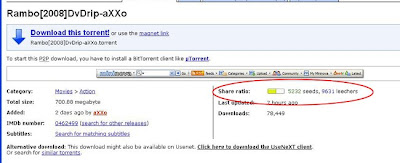
Next, read the comments. if others are saying its got a virus or it is passworded or nuked, move on to another torrent.
Next look at the file size. It's easiest to tell on videos if it's a good file. 30 min tv eps in standard quality are around 175 mb. One hour 350mb. Standard quality 1 1/2 hour movie is 700 mb. If a file is a strange or low file size I would stay away.
As a rule I would stay away from any torrent file that is Just one single archived file (.rar or .zip) these are usually either fake or passworded. Although some release groups split files into a bunch of .rar files these are an exception.
Now look at the way the file name is tagged. Lets take a look at a example:
the.office.412.hdtv-lol
It has the name of the show, (the office), the season(4), the episode number(12), quality/source (hdtv) and who released it (lol)
Get familiar with the groups who release the files its another good way to get good quality virus free files. here are some good release groups to look for:
LOL
AXXO
Klaxxon
Also you could do a search for just the release group on mininova or any other site to get a list of thier files, but always make sure to look at who uploaded the file, it's easy just to slap a release groups name on a file.
It seems like alot just to download a file but it will become second nature if you download alot.
4. Going further
Using these methods will eventually allow you to find pretty much anything, and keep you from getting viruses and trashed files.
If you use torrents a lot it can get overwhelming checking each site for every release. You can set up RSS feeds for your sites and releases in firefox or a news reader which can save you time.
It's also faster and slightly safer if you use member only torrent sites. Keep checking these sites for open sign up dates.
5. Final Information
Remember that in most countries it is illegal to download copyright infringing material without paying for it. Always try to find what you are looking for in a legal way. If your into Tv shows most all the network streams alot of their episodes online for free. There is also other websites that offer free streaming movies. check out my earlier post on this info. HERE
ver 1.0
1. Basic Info
First lets start off with a brief and simplified explanation of what a torrent is. A torrent file is a small file that you download and then open in a torrent client. Once you open a torrent file in a client it will connect to other users downloading or seeding the particular file and download the file in pieces to your computer. The more people seeding or downloading a file, the faster it will download. Seeding means that a user is uploading the file to you.
Its important to keep up to date with the torrent community and not just download every file you see. Or else you could download viruses, get a trashed file or get in trouble with your isp or other groups. So its important to protect yourself and use a set of rules while downloading.
If you would like to understand the torrent protocol in more detail here is some further reading links:
Bittorrent Wiki
Bittorrent on HowStuffWorks
2. Programs and Sites
Now that you understand what a torrent is and why you need to protect yourself here is the tools and sites i recommend:
Programs:
Utorrent
Best torrent client out.
Peerguardian
Peer guardian will block ip addresses from ill meaning computers, it won't protect you 100% but it is a must have and make sure to keep the lists updated.
AVG Free
You should have a anti virus prog if your on the internet at all, and more so if you download torrents. Keep it up to date
Gspot
If you download a video and have trouble playing it, this program will tell you which codec you need to play it and if you have it installed.
Nimo Codec Pack
Used for playing many different video formats.
Websites:
Mininova
Massive torrent archive
isohunt
If you can't find it on mininova go here.
Seedpeer
This site has verified torrents
EzTV
Excellent site for tv torrents
torrentfreak
Keep up to date on torrent news
3.Searching and Downloading
So after you have downloaded all the programs and bookmarked all the sites
and are ready to download a torrent, follow these steps:
Make sure Anti-virus and Peer Guardian are running and on.
Search for the torrent, start with Mininova, if you cant find what you are looking for there, move on to the other sites.
Iff you get alot of search results for what you are looking for, investigate the torrent with the most seeds and downloaders. Ex.1

Next, read the comments. if others are saying its got a virus or it is passworded or nuked, move on to another torrent.
Next look at the file size. It's easiest to tell on videos if it's a good file. 30 min tv eps in standard quality are around 175 mb. One hour 350mb. Standard quality 1 1/2 hour movie is 700 mb. If a file is a strange or low file size I would stay away.
As a rule I would stay away from any torrent file that is Just one single archived file (.rar or .zip) these are usually either fake or passworded. Although some release groups split files into a bunch of .rar files these are an exception.
Now look at the way the file name is tagged. Lets take a look at a example:
the.office.412.hdtv-lol
It has the name of the show, (the office), the season(4), the episode number(12), quality/source (hdtv) and who released it (lol)
Get familiar with the groups who release the files its another good way to get good quality virus free files. here are some good release groups to look for:
LOL
AXXO
Klaxxon
Also you could do a search for just the release group on mininova or any other site to get a list of thier files, but always make sure to look at who uploaded the file, it's easy just to slap a release groups name on a file.
It seems like alot just to download a file but it will become second nature if you download alot.
4. Going further
Using these methods will eventually allow you to find pretty much anything, and keep you from getting viruses and trashed files.
If you use torrents a lot it can get overwhelming checking each site for every release. You can set up RSS feeds for your sites and releases in firefox or a news reader which can save you time.
It's also faster and slightly safer if you use member only torrent sites. Keep checking these sites for open sign up dates.
5. Final Information
Remember that in most countries it is illegal to download copyright infringing material without paying for it. Always try to find what you are looking for in a legal way. If your into Tv shows most all the network streams alot of their episodes online for free. There is also other websites that offer free streaming movies. check out my earlier post on this info. HERE
ver 1.0
Thursday, May 8, 2008
Links!!!!
Did it Leak
If you ever find yourself wondering if your favorite bands album has leaked yet go here.
Cool site of the day
Exactly what it sounds like
Picnik
Another good online photo editor
Berkelys courses online!
Video lectures
Morning Becomes Ecclectic
The best bands Live streaming video!
If you ever find yourself wondering if your favorite bands album has leaked yet go here.
Cool site of the day
Exactly what it sounds like
Picnik
Another good online photo editor
Berkelys courses online!
Video lectures
Morning Becomes Ecclectic
The best bands Live streaming video!
Saturday, April 26, 2008
Subscribe to:
Posts (Atom)